TransendPay SDK Documentation
The TransendPay SDK is a JavaScript library that allows suppliers to integrate Transend as a payment option on their websites. This SDK provides a seamless way to open a payment modal, process users through the Transend Pay flow, and listen to events related to the payment process.
Key Features
- Open a payment modal for customers to complete transactions.
- Listen to events such as transaction approval, denial, or failure.
- Customize the modal and button behavior to fit your website's needs.
Sandbox (Mock) Environment
You can use the TransendPay SDK with the Transend SIT/Mock API for testing and development purposes. Simply hit the SIT Mock endpoints and your sessions will be automatically provided to the mock environment.
Security Considerations
Implementation details below are shown in JavaScript facing the client side (i.e. on a web page). This allows for a simplistic approach in integrating the TransendPay SDK, but it also means that sensitive information (like client secrets) could potentially be exposed. Always ensure that sensitive operations are performed server-side.
For example, instead of performing calls to the Transend API directly in the frontend, which could expose your client ID and secret to attackers, you could set up a backend service to handle these requests securely and then call your backend service from your frontend.
Download the SDK
The TransendPay SDK is available for static download (or import) from our Google Cloud Bucket. You can download the latest version here.
TransendPay SDK (v1.5.0)Implementation Guide
Step 1: Import the SDK
Include the TransendPay SDK in your website by importing the provided link or statically downloaded file. This can be done via a <script> tag in your HTML.
<script src="transend-pay-sdk-vX.Y.Z.js"></script>The SDK will expose a global object transendPay on the window.
Step 2: Initialize the SDK
Create an SDK instance using the init function. This function takes optional configuration options.
const controller = transendPay.init({
zIndex: 9999, // Optional: Customize the z-index of the modal overlay
});The controller object returned by init will be used to interact with the SDK.
Step 3: Collect Purchase Information
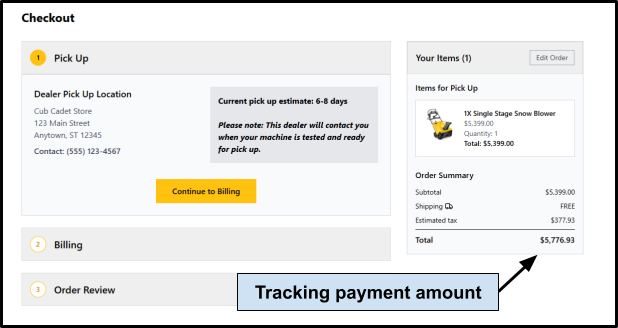
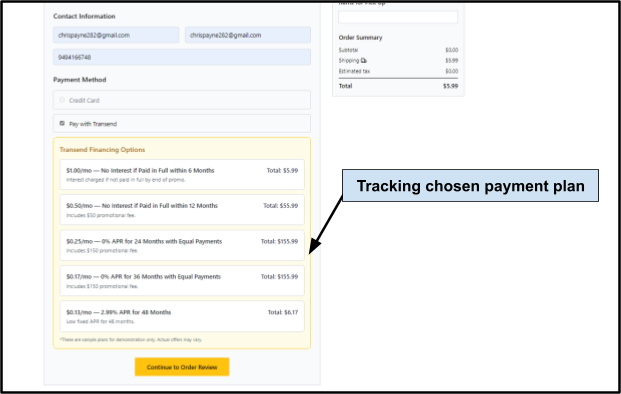
As the buyer navigates your site, collect key information such as the purchase amount and payment plan ID. This information will be used to generate a session ID.
Step 4: Obtain a Session ID
When the customer chooses to pay with Transend, send a request to the Transend API with the payment plan ID and purchase amount to obtain a session ID. The session ID represents a cart checkout session, not a user authentication token. You need to provide your client id and client secret as a Basic authentication token in the Authorization header.
You can provide an optional callback url to this endpoint, which will be hit with a standard payload upon a session status change. For example, if you wanted to maintain a store of created sessions and associated statuses, you could provide a webhook to receive session updates.
// Example: Fetch session ID from Transend API backend
const clientId = 'your-client-id';
const clientSecret = 'your-client-secret';
const resp = await fetch(transendApiBase + '/getModal', {
method: 'POST',
headers: {
'Content-Type': 'application/json',
'Authorization': 'Basic ' + btoa(clientId + ':' + clientSecret)
},
body: JSON.stringify({
planId: paymentPlanId, // Payment plan ID obtained from previous step
amount: purchaseAmount, // Amount in decimal format (e.g., 100.00)
invoiceNumber: 'INV-1001', // Optional invoice number for internal tracking
callbackUrl: 'https://my-backend-api.example.com/callback' // Optional callback url on session status changes
}),
});
const data = await resp.json();
// data = { sessionId: "<GUID>", url: "<MODAL_URL>" }Step 5: Open the Modal
Use the open function to display the Transend payment modal. Pass the session ID and an onClose handler. This sets the customer through the Transend payment process by interacting with a Transend modal. The onClose handler runs after Transend makes a decision and either accepts or closes the customer's transaction.
controller.open({
sessionId: data.sessionId, // Obtained from `getModal` call
url: data.url, // Obtained from `getModal` call
onClose: () => {
console.log('Modal closed'); // `onClose` occurs after ANY decision made by Transend
},
});Step 6: Find Session Status
After the modal closes there are two methods you can use to obtain the resulting session status (accepted, closed, etc). First, you can hit the Transend API /status endpoint directly in the onClose handler.
const clientId = 'your-client-id';
const clientSecret = 'your-client-secret';
controller.open({
sessionId: data.sessionId, // Obtained from `getModal` call
url: data.url, // Obtained from `getModal` call
onClose: async () => {
console.log('Modal closed'); // `onClose` occurs after ANY decision made by Transend
// Now fetch session status
const resp = await fetch(transendApiBase + '/status', {
method: 'POST',
headers: {
'Content-Type': 'application/json',
'Authorization': 'Basic ' + btoa(clientId + ':' + clientSecret)
},
body: JSON.stringify({
sessionId: sessionId,
}),
})
.then(r => r.json()) // On success, parse response
.catch((err) => { // Handle error state from '/status' call
console.error('Error checking session:', err);
});
if (resp.status === 'ACCEPTED') {
// Handle acceptance state (customer accepted transaction)
} else if (resp.status === 'CLOSED') {
// Handle closed state (transaction was denied)
} else if (resp.status === 'ERROR') {
// Handle error state
}
},
});In addition, you could have specified a callback URL to the getModal request. This can allow for custom implementations where you could call your own API and get status updates from there.
API Reference
transendPay.init(options?: InitOptions): Controller
Description: Initializes the SDK and returns a Controller instance.
Parameters:
options.zIndex(number, optional): Z-index for the modal overlay.
Returns: A Controller instance.
Controller.open(opts: OpenOptions): void
Description: Opens the Transend payment modal.
Parameters:
opts.sessionId(string, required): The session ID for the transaction.opts.onClose(function, required): Callback fired when the modal is closed
Controller.close(): void
Description: Closes the modal if it is open.
Example Integration
This simplified example demonstrates how to initialize the SDK, open the modal, and handle events.
<script src="https://.../transend-pay-sdk-vX.Y.Z.js"></script>
<button id="pay-button">Make Payment</button>
<p id="result"></p>
<script>
// App constants
const clientId = "your-client-id";
const clientSecret = "your-client-secret";
const transendApiBase = "<PROVIDED_BASE_URL>/api/v1/transendpay";
// TransendPay Controller
const controller = transendPay.init();
// Result div to display modal results
const result = document.querySelector('#result');
document.querySelector('#pay-button').addEventListener('click', async () => {
// Get new session ID
const data = await fetch(transendApiBase + '/getModal', {
method: 'POST',
headers: {
'Content-Type': 'application/json',
'Authorization': 'Basic ' + btoa(clientId + ':' + clientSecret)
},
body: JSON.stringify({
amount: 100.00, // Fixed payment amount of $100.00
planId: 1, // Fixed payment plan with ID = 1
}),
}).then((res) => res.json());
// Open modal
controller.open({
sessionId: data.sessionId,
url: data.url,
onClose: async () => {
// On close, fetch session status
const resp = await fetch(transendApiBase + '/status', {
method: 'POST',
headers: {
'Content-Type': 'application/json',
'Authorization': 'Basic ' + btoa(clientId + ':' + clientSecret)
},
body: JSON.stringify({
sessionId: data.sessionId,
}),
})
.then(r => r.json()) // On success, parse response
.catch((err) => { // Handle error state
console.error('Error checking session:', err);
});
if (resp.status === 'ACCEPTED') {
result.innerText = 'Your transaction has been accepted!';
} else if (resp.status === 'CLOSED') {
result.innerText = 'The transaction has been closed';
} else if (resp.status === 'ERROR') {
result.innerText = 'You have encountered an error';
} else if (resp.status === 'PENDING') {
result.innerText = 'You have left the process early';
}
},
});
});
</script>